Build and convert
bubble-convert
Convert one chapter, all chapters, or an arbitrary Markdown file.
# Chapter by number
bubble-convert 1
bubble-convert              # all chapters

# Options
bubble-convert 1 --style square --template lulu_7x10
bubble-convert 1 --style circle --chapter-opener-size 5
bubble-convert 1 --lang cn
bubble-convert 1 --main-font "EB Garamond" --body-font-pt 11
bubble-convert 1 --optimize-pdf --optimize-pdf-quality ebook

# Non-chapter Markdown
bubble-convert margins/poem.md --format docx
Chapter styles
--style |
Description |
|---|---|
circle |
Quarter-circle chapter number |
square |
Blue square |
none |
Plain chapter opening |
Chapter opener size
--chapter-opener-size CM sets the opener badge size (square side or circle radius) and scales the chapter numeral font. Default: chapter_opener_size_cm in peanut.config (4 cm).
bubble-build --style square --chapter-opener-size 5
bubble-convert 1 --chapter-opener-size 4.5
Output formats
Default is PDF. Alternatives:
bubble-convert 1 --format epub
bubble-convert 1 --format docx
EPUB and DOCX use Pandoc (no LaTeX). Mermaid diagrams are rendered to PNG in all export formats, including EPUB and DOCX. Layout may differ from PDF.
bubble-build
Assemble the full book from all chapters, preface, appendix, covers, and TOC.
bubble-build
bubble-build --style square --max-chapters 21
bubble-build --lang cn --optimize-pdf
bubble-build --cover 7x10-packt
bubble-build --no-cover --style none
bubble-build --format epub
bubble-build --format docx --lang cn    # book_zh.epub
bubble-build --format html              # book_html/
bubble-build --format html --lang cn    # book_html_zh/
Notable flags
| Flag | Effect |
|---|---|
--chapter-opener-size |
Opener badge size in cm (square/circle geometry + chapter numeral font); overrides chapter_opener_size_cm |
--format html |
Static HTML site instead of PDF (see below) |
--no-cover |
Interior-only; output name gets _interior suffix |
--optimize-pdf |
Shrink PDF (GS for en/sp, qpdf for CJK) |
--protect |
Anti-copy rasterization (large files) |
--include-appendix |
true, false, or auto |
--with-time |
Timestamp in output filename |
Output naming
| Locale | Style | Example PDF |
|---|---|---|
en |
square | book_square.pdf |
cn |
square | book_zh_square.pdf |
en |
none, no cover | book_none_interior.pdf |
bubble-render-html
Build a static HTML book site (same sources as PDF, no LaTeX):
bubble-render-html
bubble-render-html --lang cn
bubble-render-html -o dist/html
bubble-render-html --theme dark --no-mathjax
bubble-render-html --max-chapters 21
bubble-render-html --cover 7x10
| Flag | Effect |
|---|---|
--lang |
Locale (en, cn, tc, jp, sp) |
-o, --output |
Output directory |
-t, --title |
Site title (default: book_title from config) |
--theme |
default, dark, or minimal |
--css |
Custom CSS → assets/custom.css |
--no-mathjax |
Disable MathJax |
--max-chapters |
Limit chapter count |
--include-appendix |
true, false, or auto |
--cover |
Cover folder under cover/ |
Default output: book_html/ or book_html_{tag}/. Full details: HTML generation.
bubble-merge
Merge chapter Markdown into review-friendly single files:
bubble-merge
bubble-merge --en-only
bubble-merge --zh-only
bubble-merge --lang tc
Default: auto-detect languages via locales.langs_for_merge; warns on partial translations.
bubble-proposal
Single Markdown → proposal PDF (Pandoc + LuaLaTeX/XeLaTeX):
bubble-proposal querytracker/proposal.md --lang en --style square
bubble-proposal notes/sample.md --lang cn --optimize-pdf
YAML front matter (title, author, runtitle, …) enables full U.S. proposal title page layout. Without title, output uses compact article style.
bubble-paper
Single Markdown → academic paper PDF (Pandoc + LuaLaTeX):
bubble-paper --init
bubble-paper paper.md --papersize a4
bubble-paper paper.md --two-column --optimize-pdf
YAML front matter: title, author, affiliation, abstract, keywords, bibliography (path to .bib for --citeproc). Uses templates/paper_style.tex.
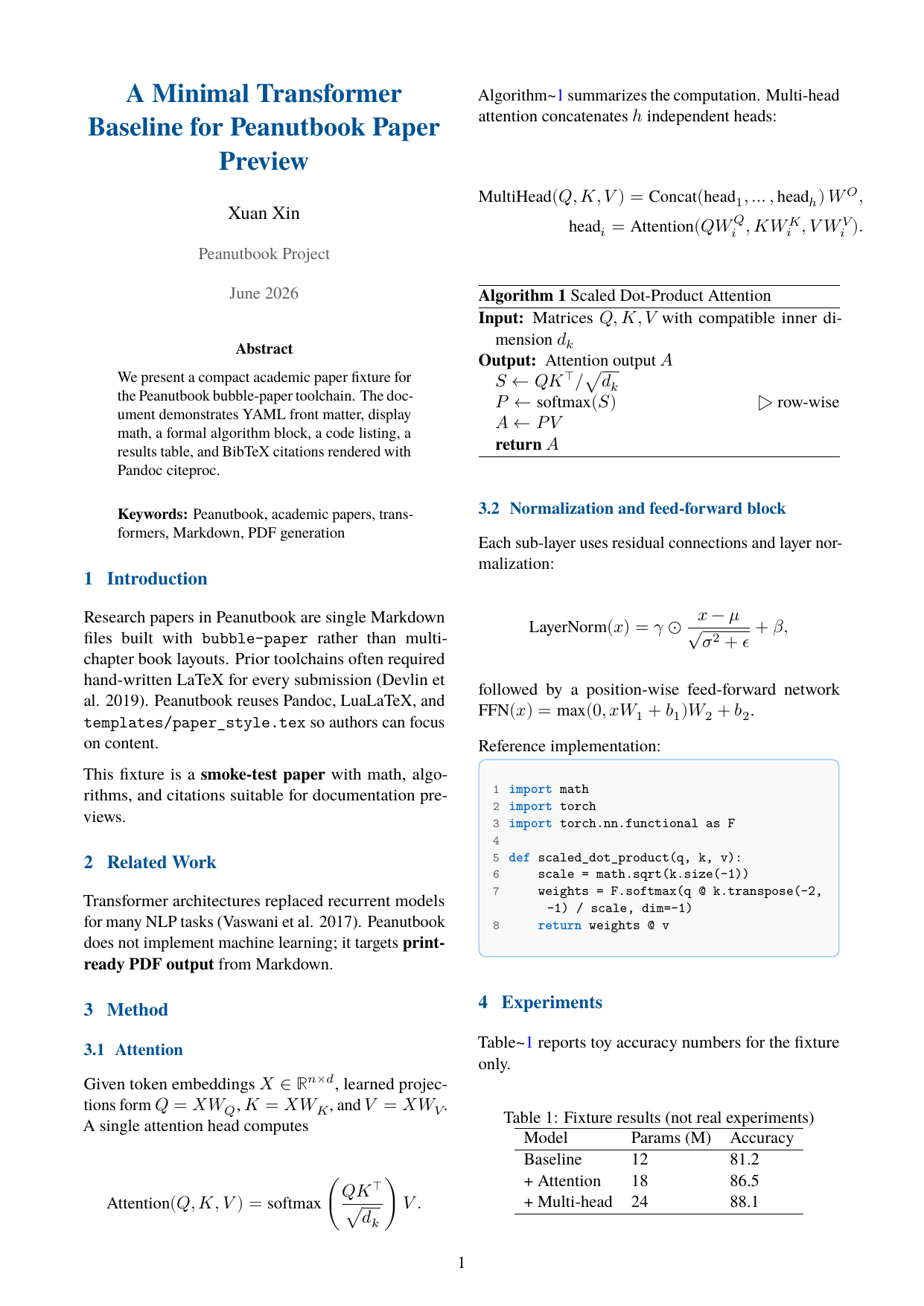
Full guide with layout screenshots: Academic papers (bubble-paper).
bubble-bizplan
Single Markdown → business plan PDF (Pandoc + LuaLaTeX). Uses peanut-biz.config, not peanut.config.
bubble-bizplan --init bizplan.md
bubble-bizplan bizplan.md --cover-name tech-white --strict
bubble-bizplan bizplan.md --check-only
Full guide: Business plans (required sections, cover styles, config keys, Python API).
bubble-monitor
Watch files and rebuild on save:
bubble-monitor 1 2 3
bubble-monitor --lang tc 1
Requires watchdog (installed with bubble).
bubble-scaffold
Interactive project bootstrap:
bubble-scaffold
bubble-scaffold --chapters 10 --lang both --yes
bubble-scaffold --lang zh --yes
bubble-scaffold --bizplan
bubble-scaffold --paper
Creates chapter stubs, peanut.config, and cover/7x10/ placeholders. With --bizplan, scaffolds bizplan.md. With --paper, scaffolds paper.md.
bubble-split-pdf
Split a built PDF into N parts (e.g. for platform upload limits):
bubble-split-pdf book_zh_square.pdf -n 5
bubble-split-pdf --dry-run
Requires qpdf; page count from pdfinfo or PyPDF2.